Showing posts with label classroom management. Show all posts

Tuesday, September 20, 2016

3 Free Apps to Use Now

Are you looking for some easy to use free apps to add to your tech toolbox? Here's a quick rundown of 3 apps you can begin using right away in your classroom!
Class Monster Lite uses an adorable monster to help your classroom monitor their own noise level. Simply set your noise sensitivity preferences and let the app do the rest.
A low noise level results in a happy monster.

As noise levels increase, the monster becomes upset.

Too much noise makes the monster cry. 
There is a pro version with extra features, but I find the lite version to work fine in my classroom.

One of my favorite apps of all time is so simple yet effective. Tap Roulette will instantly settle any disagreement! Have students place one finger on the iPad screen and watch the magic happen. When you press pick finger the screen will light up before randomly picking someone. The lucky winner will have a red circle appear where their finger is.

Shake 'Em Dice is a new to me app a friend told me about this summer. The basic red dice are free. Other dice pairs are $0.99 each. 

You can add as many or as few dice pairs that you need. This app might also work well as a cool down activity for students. 
Do you have any favorite apps that are easy to use? Share them in the comments below!

Monday, September 5, 2016

Parent-Teacher Communication

Happy Labor Day friends! I hope you're enjoying at least a few hours of rest today. Some of us have already been back to school for weeks, while others will be starting this week. Here's a quick rundown of how you can increase or switch up your parent-teacher communication this year.
This year for my school's annual parent-teacher meeting, I decided to make a "snapshot" sheet for parents.This sheet will serve as a quick reference guide for parents during the school year.
 This year I created two Google forms for parents in my class. One is for parents to share contact information with other parents in the classroom to help make organizing parties or play dates easier. In the past I've had parents ask me to give the phone number or email of another parent, which I am never comfortable doing because of privacy. The other Google form is for us to share and upload class pictures during the year.
Next up is VolunteerSpot. This website helps you organize volunteers, snack time, and anything in 
between. It's free to sign up and begin scheduling with the option of paying for some extra features.
I like using this website to schedule parent volunteers on Friday afternoon. Your dashboard will tell you how many of your spots have been filled, and you can even use settings to email parents a reminder before their selected date/time.
If you're still using paper forms to schedule your conferences save yourself a headache with Doodle. This is another free (don't teachers just love that word) website to make scheduling easy peasy. You choose dates and times for parents to select from. 
Doodle allows you to add as many times to one date as you'd like and you select how many options parents can choose from. 

I have a full blog post on how I use schedule parent-teacher conferences here.
This year I'm excited to add Remind to my communication toolbox. Ever been home when you remember an important email or announcement you forgot to send to parents? Me too! 
Remind is a free app and website that allows you to send text messages to your parents. 
It's really that easy! In addition to plain text, you can send attachments or record your voice. Even if you or your parents don't have access to email, chances are you've got a cell phone and can receive texts. 
I hope you've found a new tip or two for your parent-teacher communication. What are some of your favorite apps or websites to share information? Enjoy the rest of your week!

Thursday, May 21, 2015

Guest Post!

My first guest post for the wonderful Rachel Lynette is now live! Head over to read the post and learn how I incorporate paperless parent-teacher communication into my classroom!

Happy Thursday!

Saturday, February 21, 2015

You Oughta Know

Happy Saturday friends! I'm excited to link up again for another month of...
Thanks Jasmine for hosting one of the best blog hops around!
Today I've got a quick and easy app you may not be familiar with. Think of Tap Roulette  as the techified version of rock, paper, scissors.
Kids can't agree on who goes first playing a game? Your team can't decide on who will pick where to eat during the oh so fabulous extended lunch during staff development? Tap Roulette to the rescue! The app automatically picks someone for you. Everyone places one finger somewhere on the iPad, press pick finger, and voila! No more kids wasting time over who gets to go first. Who doesn't love free apps that are easy? 


Wednesday, February 18, 2015

I-Time Tub

Happy Hump Day everyone! Let's talk intervention time shall we? It's the perfect time of day we have set aside to work with minis in small groups. No phone calls, everything flows smoothly, and there are never interruptions right? Um, how about a big fat NO! It is just me or does it seem like chaos can develop when intervention time is about to start?
I started thinking of ways I could still meet with my small groups while still giving some of my other minis a chance to still do meaningful activities. After one trip to Five Below the I-Time tub was born.
I wanted to have another option for my intervention students besides computer work or reading a book. Computer programs are great, but they will never take the place of teacher interaction. Some days I discover one or two students may need more or less time with me depending on their needs. 
Here's a quick rundown of what's currently in the I-Time tub.

We love the different Candy Land games from Mel D.  Mel has a fantastic variety of Candy Land games for both reading and math to fit your needs. The games are easy to play and engaging at the same time.
Fluency With a Twist is always entertaining. I created this product not only to help with fluency, but also reading with expression.
Zinger!  file folder games are also a rotation for the I-Time tub. Minis practice spelling and phonics with a partner or alone. All that's needed is a bag/small bucket and a timer. Here are two minis playing Zinger! R Controlled Vowels.

Amy Lemons always has amazing products. We're currently in love with the Spin On math stations.  I decided to make the stations into file folder games to save on copies. Who knew a paper clip could make math so engaging?

Fluency has been a big focus in the last couple of weeks. Christina DeCarbo has created fluency passages that also help with comprehension.
There are more rotating activities that I'll hopefully blog about later. I'd love suggestions on additional things to add. 
Enjoy the rest of your week!

Saturday, January 17, 2015

You Oughta Know About...

Happy Saturday friends! I'm excited to join Jasmine again from Buzzing With Mrs. McClain for another month of...
This month I think you oughta know about VolunteerSpot. I have a fabulous group of techified parents this year, and use VolunteerSpot to organize Friday afternoon help.

Creating a free account is easy. Simply click on create new sign up when you're ready to begin.

Customize the sign up to best fit your needs. I need Friday afternoon help, so I always choose multiple days. I choose not to have participants see who else has signed up.

Enter your information and what information you want from parents.

Now you're ready to create dates and times.


You're able to add new "spots" to whatever dates you choose.

At this stage, you're now ready to invite participants in a variety of ways.

I've always preferred a shareable link that can be sent in an email.

Another great feature of Volunteer Spot is choosing what updates you receive and how often. Participants can get a reminder email when it's close to their volunteer sign up date.


Saturday, November 15, 2014

You Ought Know About Learning Spaces

Happy Saturday friends! I hope your weekend is all kinds of fabulous! I'm thrilled to participate in my very first blog hop this month with Jasmine over at Buzzing With Mrs. McClain.
Last year I started implementing learning spaces with my minis, and let me tell you it's been one of the best changes I've made. I'm a huge advocate of movement in the classroom. If our minis aren't getting the nourishment and oxygen they need for their brains we can't expect them to learn. Nourishment and oxygen will only happen with activity, not sitting in a chair all day in a lecture type environment. I'm so passionate about this subject I could ramble on, but I won't! On to the blog post...

This is what my classroom looks like at least a few times a day.


There used to be an extra bookshelf where those ottomans now are, but I wanted that area to be more effective. 
With the exception of taking tests, I allow students to choose their learning space with clear expectations. Students know learning spaces are a privilege, and if they choose not to make good choices that privilege is lost. 
This is our listening lounge which I originally intended only to be used during listening station but now is a popular area in the classroom. 


I was so scared the first time I tried learning spaces that it would only cause chaos. When everyone is in their preferred learning space it's so quiet you could hear a pin drop. I also make sure there are plenty of clipboards to go around so time isn't wasted looking for a flat surface to write on.
I'm hoping to add more pillows and some bean bags to my room this year. I wish I weren't so picky about what I wanted and it'd get done a lot quicker. 


Sunday, October 12, 2014

Parent Conference Scheduling

Happy Sunday teacher friends! I'm anxiously awaiting the new season of The Walking Dead to start in about 30 minutes! Believe it or not, I do watch something else besides The Real Housewives. :)
Have you heard of Doodle? It's a great resource for scheduling parent-teacher conferences. It's both quick and easy for teachers to schedule and parents to sign up. I've been using Doodle for the last three years. Trying to accommodate everyone with paper copies sent home took more time and I found myself constantly switching things to get it right.
 I'm going to take you through a quick tutorial to get your started. The first step is giving your event a name. Location and description are left blank because I think both of those things would be self explanatory to parents.


Select as many dates as you'd like. Click the double arrow to move to the next month.

You enter what times you have available for conferences for the dates you selected. This is part of Doodle will take you the most time since you tailor the schedule to fit your needs.

You'll notice at first you only see three different time slots. Simply click on add further time slots for any date. Our parent conference night is the 29th, so I kept adding more time slots until I had what I needed.

Pay close attention to your settings before you finalize your schedule. The options are self explanatory. Always make sure you choose only one participant per option and limit what they can pick. I like the hidden poll option because sometimes not everyone needs to know what other are doing. Not everything is always everyone's business know what I mean?

I always choose to send the invitation myself.

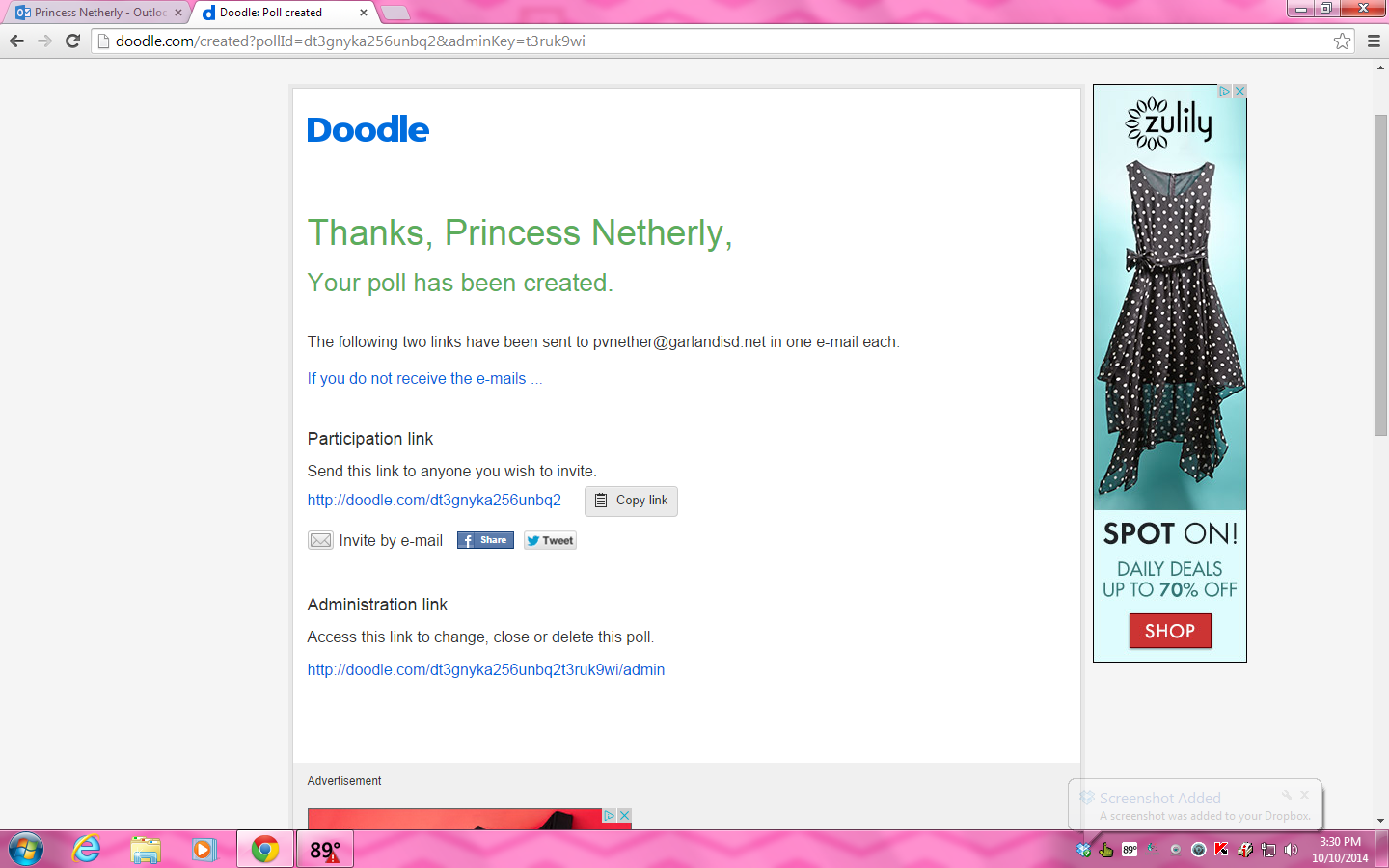
Easy peasy lemon squeezy your now ready to share with parents! The time is takes me from start to finish is less than 10 minutes.Doodle will email you an admin link. Keep it handy just in case you need to make changes. The participation link goes out to all your parents. 

Remind your parents to include their name when they sign up and hit submit to lock in their preferred time. When a parent participates you'll get an email from Doodle. From that point I go back to my admin link to see what times have been taken.


Shout out to my techie-fied parents this year! They are rocking and rolling with technology! I should clarify that I do send out the traditional paper forms for conferences, but it is by request only. I explain online sign up is easier for both parents and myself. Confirmation for a conference via a paper form takes longer to get back to parents, plus the date and time they want might get taken quickly.
Enjoy the rest of your Sunday!